



2026-07-10
How to use color sensor? The 7 most concerned issues for engineers
Q1: What is the difference between color sensors and color code sensors? Which one should I choose?
Simple distinction: Color code sensors can only recognize "whether there is color difference" - for example, if a black mark is printed on white paper, it detects a change in contrast and outputs a signal. The color sensor (RGB type) can recognize "what specific color it is" - it can distinguish multiple colors such as red, blue, green, etc.
How to choose:
Your production line only needs to find a fixed marking point (such as the color code and label position on the packaging bag) → color code sensor is enough, with low cost and fast response
Your production line needs to distinguish multiple colors (such as sorting parts of different colors, detecting multi-color printed products) → requires multi-channel color sensors
There is also a common misuse: using a color sensor to distinguish two colors that are very close (such as deep blue and dark black), if the contrast is not enough, it will misjudge. This situation requires the use of RGB sensors with higher color resolution accuracy.
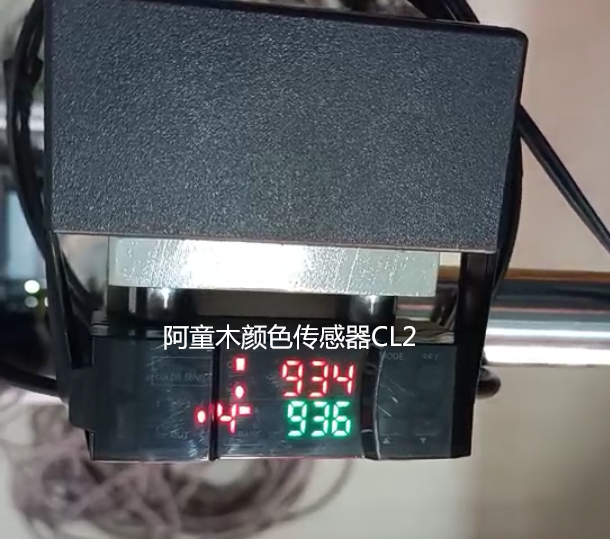
Q2: Can black objects be detected using a color sensor?
Yes, but it's important to pay attention to the method.
The reflectivity of black surfaces to light is very low (only about 1/5 of that of white), which means that the reflected signal received by the sensor itself is weak. If targeted adjustments are not made, it is easy to encounter situations where the signal cannot be detected or is unstable.
Solution:
1. Shorten the detection distance: bring the sensor closer to the object being measured to enhance the reflected signal
2. Choose models with higher sensitivity: long-distance models or sensors specifically optimized for dark color detection, which perform more stably in low reflectivity scenarios
3. Adjust the type of light source: Some sensors support switching the color of the light source (red/green/blue). Different colors of light have different reflection characteristics on black surfaces, and switching to a different light source may result in better results
4. Ensure correct installation angle: avoid vertical illumination (which can easily cause mirror reflection interference), tilt the sensor appropriately, and receive diffuse reflection signals
Key point: When using black objects for teaching calibration, sufficient learning signals should be given to the sensor - more black samples should be placed for sensor calibration to ensure that the threshold setting is reasonable.
Q3: How to solve the problem of color sensor false detection caused by changes in workshop lighting?
This is one of the most common usage issues with color sensors. The fluorescent lamps, direct sunlight, and equipment indicator lights in the workshop can interfere with the sensor's light source reception.
Troubleshooting and solution ideas:
Step 1: Check if the sensor has ambient light suppression function
A good color sensor comes with ambient light compensation, which can automatically filter out external light interference. If your sensor does not have this function, it is indeed prone to problems in workshops with large changes in lighting.
Step 2: Check the installation position
Do not face the sensor detection window towards the window or strong light source direction
Avoid direct sunlight in the detection area
If it is impossible to avoid changes in ambient light, add a light shield to the sensor to block external light
Step 3: Re calibrate
Perform teaching calibration under actual lighting conditions in the workshop (not in a laboratory environment) to enable the sensor to learn the background light characteristics of the current environment.
Step 4: Shorten the detection distance
The closer the distance, the stronger the intensity of the sensor's own light source compared to the ambient light, resulting in a higher signal-to-noise ratio and stronger anti-interference ability.
Q4: What is the typical detection distance of a color sensor? What are the risks of choosing far away?
Common working distance: The optimal detection distance for most color sensors is between 10-50mm, and some long-distance models can achieve a distance of over 500mm.
It is not recommended to blindly choose a long distance for three reasons:
1. Signal attenuation: The farther the distance, the weaker the light reflected back to the sensor, resulting in a decrease in color recognition accuracy. Especially for dark objects and low contrast scenes, it is almost impossible to detect them stably from a distance
2. Increased spot size: As the detection distance increases, the spot diameter also increases. If your color code is very small (such as a 3mm wide mark), if the light spot is too large, it will illuminate both the color code and the background at the same time, diluting the contrast and causing unstable detection
3. Decreased anti-interference ability: At long distances, the relative advantage of the sensor's own light source over ambient light is weakened, making it more susceptible to external light influences
Selection suggestion: If the installation space of the equipment allows, try to choose a model with a closer detection distance, stronger signal, higher accuracy, and more stability. Only when the installation space is truly limited (such as limited space above the conveyor belt), should long-distance models be considered.
Q5: What are the precautions for installing color sensors?
Installation points that directly affect the stability of testing:
1. The detection window is facing the tested surface and kept parallel
The sensor is installed incorrectly, and the angle of reflected light changes, resulting in inaccurate signal values. It is recommended to control the deviation angle within 3 degrees. You can use a square ruler to assist in calibration.
2. Distance must be accurate
Install according to the manufacturer's recommended working distance (usually indicated on the sensor side or in the instruction manual). Signal saturation too close or insufficient signal too far can both affect the detection performance.
3. The fixation should be firm
There will be vibration during the operation of the production line, and if the sensor becomes loose, the detection distance will drift. It is recommended to use metal brackets for fixation, rather than plastic buckles.
4. Do not walk the cable in parallel with the power line
The sensor signal line is parallel to the power line of the motor and frequency converter, which is susceptible to electromagnetic interference. The correct approach is to cross the lines vertically or at intervals of 5cm or more.
5. Leave enough space for maintenance
The installation location should be convenient for subsequent cleaning and recalibration of the detection window, and should not be placed out of reach.
Q6: After changing a batch of materials, the color sensor suddenly became unstable. What is the reason?
Most likely, there are batch differences in the color characteristics of the materials.
Even for materials of the same color, there may be slight color differences between different batches of printing ink, surface coatings, and materials themselves. The human eye may not be able to see it, but color sensors are very sensitive - their resolution is much higher than that of the human eye, and even small color differences can cause signal values to shift.
resolvent:
1. Retesting calibration: Take the new batch of materials and let the sensor relearn the color code and background signal values. Verify the stability of the detection after calibration
2. Moderately relax the threshold range: If the color difference is confirmed to be within an acceptable range, the detection threshold range can be slightly relaxed to allow the sensor to tolerate reasonable batch fluctuations
3. Agree on color difference standards with suppliers: If batch differences persist and are significant, it is necessary to communicate with the material supplier and control them within a certain color difference range
One sentence: When the material changes, the sensor parameters also need to change accordingly. This is normal operation, not a problem with the sensor.
Q7: Does the color sensor require daily maintenance?
Required, but not complicated.
There are two main maintenance actions:
1. Regularly clean the inspection window
Dust and oil stains in the workshop will adhere to the sensor's light-emitting and receiving windows, and the signal will weaken over time. Suggest wiping once a week with a clean, dust-free cloth. The frequency is higher in food workshops or environments with oil stains.
2. Regular verification
It is recommended to verify the testing effect once a month using standard color code samples - to see if the testing indicator light is on or off normally and if the signal strength has decreased. If the signal value drops significantly compared to when it was first installed, recalibrate.
Things that don't need to be done:
No need to replace accessories regularly (no vulnerable parts)
No need to disassemble the sensor for internal cleaning
Under normal use, the lifespan can reach 5-8 years or more
Keywords: color sensor selection, color scale sensor detection distance, color sensor false detection, RGB color sensor
You May Be Interested
-
Atorm has been awarded ISO three system certification, safeguarding quality and sustainable development with international standards
2026-10-12
-
Atonm MDSC-9000T Dual-Channel, Single-Sensor Metal Double-Sheet Detector
2025-12-05
-
Non-Contact “One-to-Four” Double-Sheet Detector 1600S: A New Cost-Reduction and Efficiency Solution for Stamping Lines
2025-11-20
-
Provincial Auto Industry Research Tour | Atonm Engages with the Automotive Supply Chain, Empowering Smart Manufacturing through Sensors
2025-10-11