



2023-02-11
Atonm Color Sensor Installation and Commissioning Guide (CL1-N3S1)
Atonm Color Sensor CL1-N3S1 is commonly used in packaging equipment and across industries such as lithium batteries, food, pharmaceuticals, automotive, hardware, inkjet, screen printing, die-cutting, bag making, and zipper manufacturing for various color recognition tasks. It can automatically mix and generate the required light source for stable color detection. With intelligent digital sensitivity settings, a high-definition dual numeric display, and easy operation, it features an 8-channel design, recognizes one color simultaneously, has a 200µs fast response time, and supports multiple sensing heads for broad applications. This article provides a detailed guide for installation and commissioning.

Atonm Color Sensor CL1-N3S1
Step 1: Assembly
1. Insert the fiber
First open the sensor protective cover, press the latch, and insert the fiber. Insert the smaller-diameter fiber lead end into the sensor's light-emitting hole (there is an arrow marking on the sensor side indicating the connection position). After inserting, push the latch back to secure the fiber.
2. Connect the power
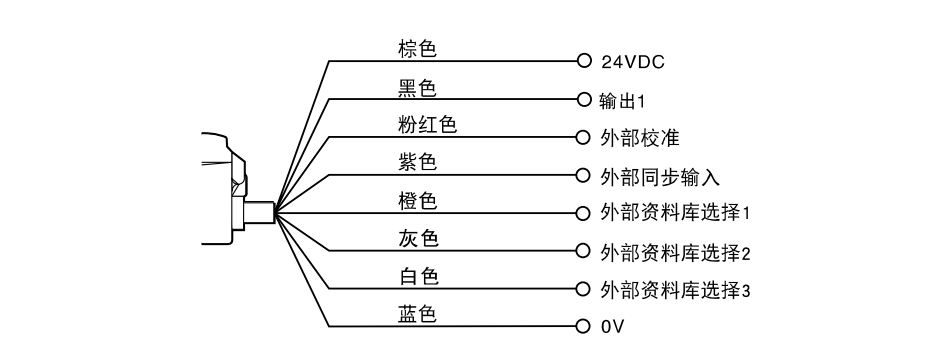
Connect the brown wire to 24V, the blue wire to 0V, and the black wire to the output point.
Step 2: Basic Operation
1. Restore factory settings
While holding the model key, press the site key five times. The sensor's red area will display RST and the green area will show n o. Press the up or down key once to show yes on the green area, then press the model key to confirm factory reset.
2. Recognition mode setting
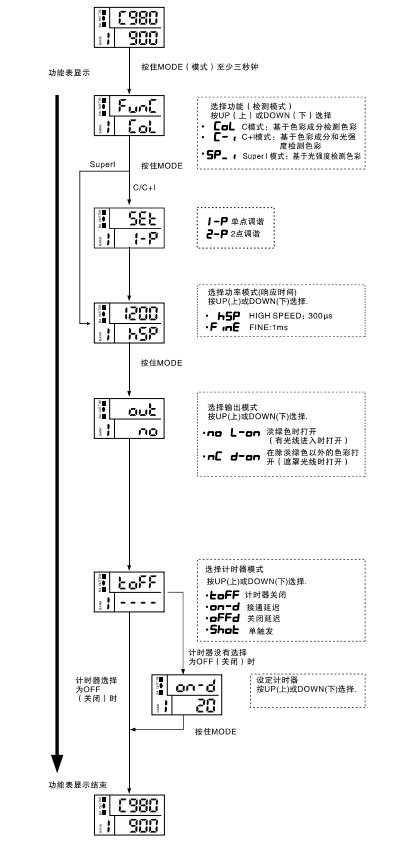
Long-press the model key for more than 3 seconds; the green area will display c o l indicating color mode.
3. Learning mode setting
Press the model key once to proceed; the green area will display 2-p indicating the learning mode.
4. Response speed mode
Press the model key again; the green area will display f i n e indicating response speed mode.
5. Output mode setting
Press the model key again; the green area will display n o indicating output mode (n o means normally open).
6. Timing function setting
Press the model key again; the red area will display t o f f indicating the timing function is off by default.
7. Exit function setting
Press the model key again; the green area will display numbers and the sensor will exit function settings.
Below is an operation demonstration video for the Atonm CL1-N3S1 color sensor to help you understand and learn operations more intuitively.
You May Be Interested
-
Atonm MDSC-9000T Dual-Channel, Single-Sensor Metal Double-Sheet Detector
2025-12-05
-
Non-Contact “One-to-Four” Double-Sheet Detector 1600S: A New Cost-Reduction and Efficiency Solution for Stamping Lines
2025-11-20
-
Mold damage, production delays? Atonm MDSC-8200T metal double-sheet detector protects automotive stamping lines
2025-10-30
-
Provincial Auto Industry Research Tour | Atonm Engages with the Automotive Supply Chain, Empowering Smart Manufacturing through Sensors
2025-10-11